9. Align the papers with the protocol
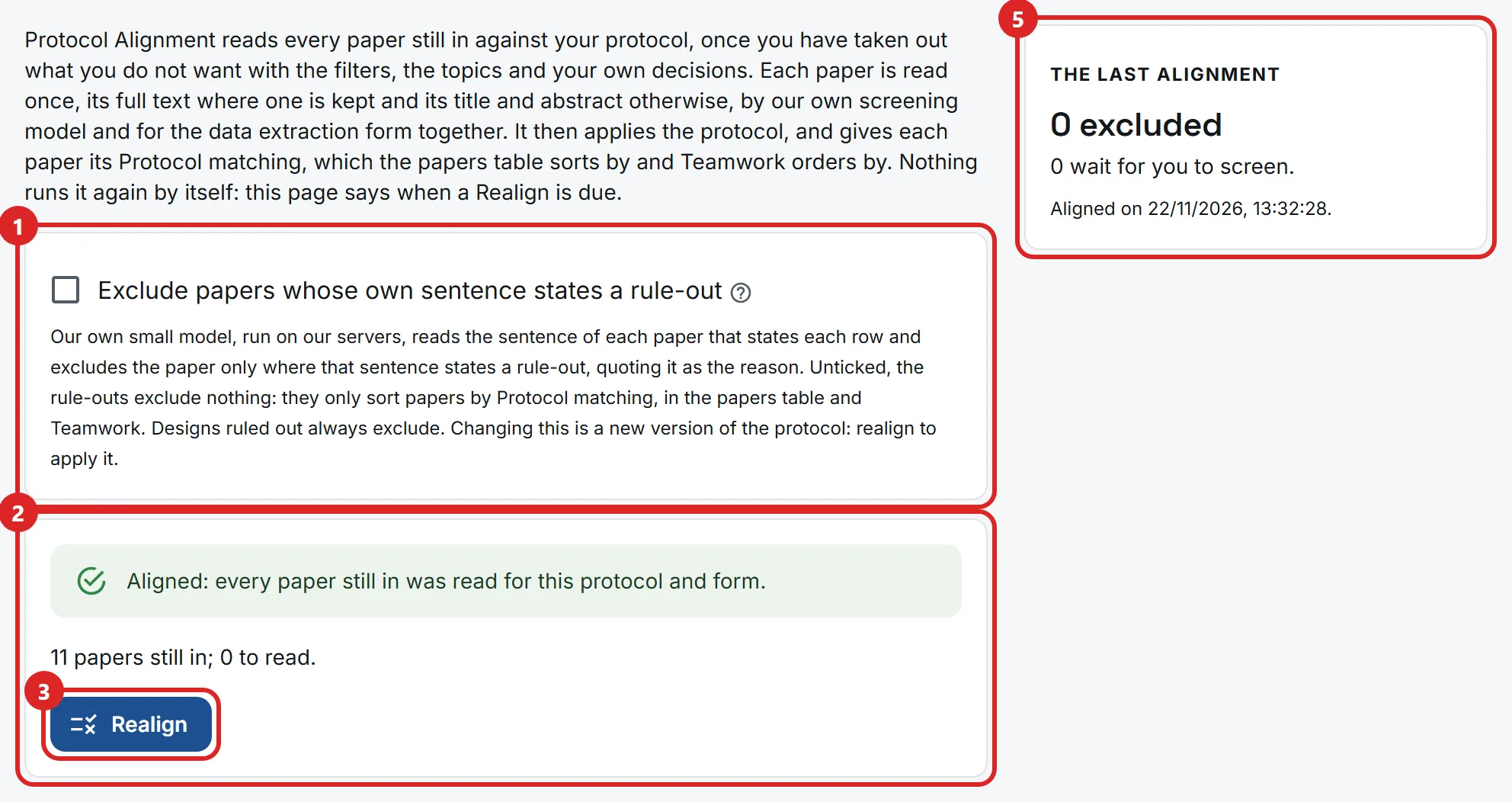
A systematic review has a Protocol Alignment step, between Word cloud and Decide by abstract; a literature review has none. The protocol you write at the start excludes nothing and reads nothing on its own. Protocol Alignment reads the papers against it, once you have taken out what you do not want with the filters, the topics and your own decisions, because reading every paper takes time.
- Tick Exclude papers whose own sentence states a rule-out to exclude such a paper, with that sentence quoted as its reason. Unticked, the rule-outs exclude nothing: they only order the papers by Protocol matching. Designs ruled out always exclude. Changing the tick box is a new version of the protocol, applied at the next Realign.
- The step says where the review stands: Not aligned yet, Aligned, or A Realign is due, and why: papers still in that were not read yet (new papers came in, or papers were put back), a paper's text changed (a full text was kept, so the paper is read again in full), the models that read the papers changed, or were still starting when they read them, the protocol changed, or the data extraction form changed. Taking more papers out never makes a Realign due. Below, it counts the papers still in and those still to read; a paper that could not be read keeps its decision and is read at the next Realign.
- Press Align, or Realign once the papers were aligned before. A warning first says how many papers it will read and roughly how long that may take; confirm with Align or Realign, or press Cancel. A bar then shows how far it has got. You can leave the page: the alignment carries on, and the bar picks it up again when you come back.
- Each paper still in is read once, its full text where one is kept and its title and abstract otherwise, for the protocol and the data extraction form together. The extraction model picks the paper's own sentence for each row and each field, and our own small screening model, run on our servers, reads whether that sentence states a rule-out or one of your criteria. A word the paper only mentions is not a rule-out stated, and nothing is excluded for what a paper does not say. The protocol is then applied to every paper no person has decided at title and abstract. Your own decisions are never changed, and any paper can be put back. PRISMA counts the papers it excludes as Records excluded by automation tools.
- The last alignment counts what it excluded, by reason, and the papers that wait for you to screen.
Nothing aligns again by itself. A Realign reads only what was not read for the current protocol and form, so after a small change it is quick. Once every paper is decided by its abstract, a Realign due because a full text was kept or the data extraction form changed need not be run: the protocol no longer decides any paper, and Extract Data reads what is new itself.
Protocol matching
After an alignment, each paper has its Protocol matching, from 0% to 100%: for each of your PROSPERO fields, how sure our own screening model is that one of the paper's own sentences states one of that field's criteria, averaged over the fields. A row the paper does not report counts nothing. A paper whose own sentence states a rule-out, or whose design is ruled out, is marked Rules itself out and comes after every paper that does not, whatever its percentage. Until the first alignment the column is blank.
The papers table sorts by it, and Decide by abstract and each reviewer take the closest papers first. Data extraction shows the values the same reading found.