The research assistant
The research assistant is a bot for literature reviews. It runs a whole systematic review with you:
- finds papers in OpenAlex, PubMed, Europe PMC, Scopus, arXiv and Crossref;
- imports what you exported from a database or a reference manager, and finds the duplicates;
- screens titles and abstracts, alone or with a second reviewer, blind;
- fetches the full texts it can reach;
- draws the PRISMA 2020 flow;
- extracts data, with the sentence each value came from;
- assesses risk of bias and draws the charts;
- maps the review's topics;
- checks a paper's references;
- exports to EndNote, Zotero, Mendeley and RevMan.
It needs no AI model. It reads what you type with the small models every Stalwart bot carries, and each answer comes from the source it searched or from your own files, never from a model's memory.
Every example on this page is a prompt you can type as it is, and every picture is the bot's real answer to it.
Language support
The selector reads turns written in English and in Brazilian Portuguese (pt-BR). The language is chosen, never guessed from the turn: the console's Settings page (Language the selector reads), language on a plan request, or the settings.language of your vocabulary file; with none of them, English. A Portuguese turn may be typed with its accents or without them. European Portuguese is not a grammar the selector has, and a turn in any other language is unread.
Quickstart: your first Scopus search
-
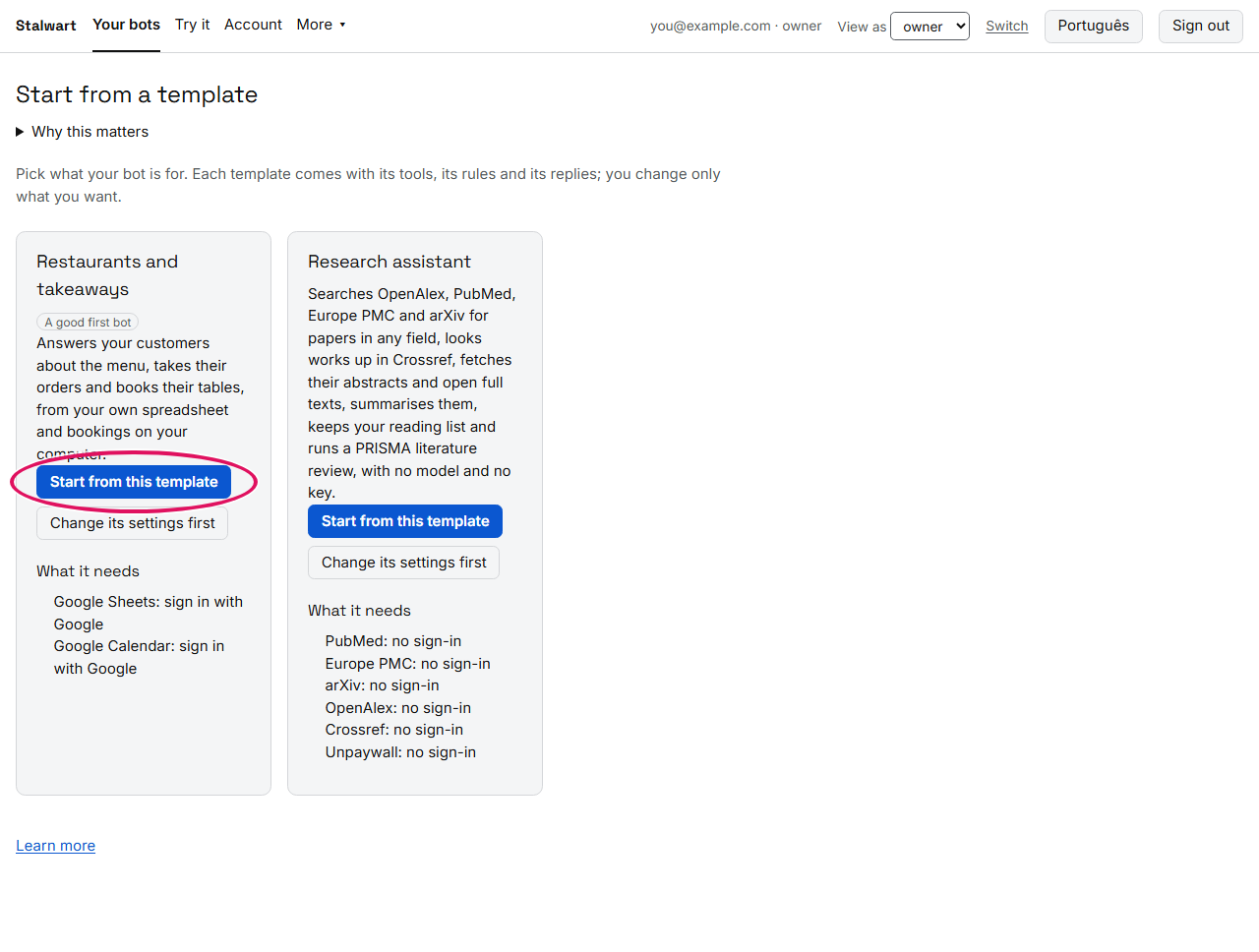
Make the bot. Sign in to the console, press Start from a template on Your bots, then Start from this template on Research assistant.
-
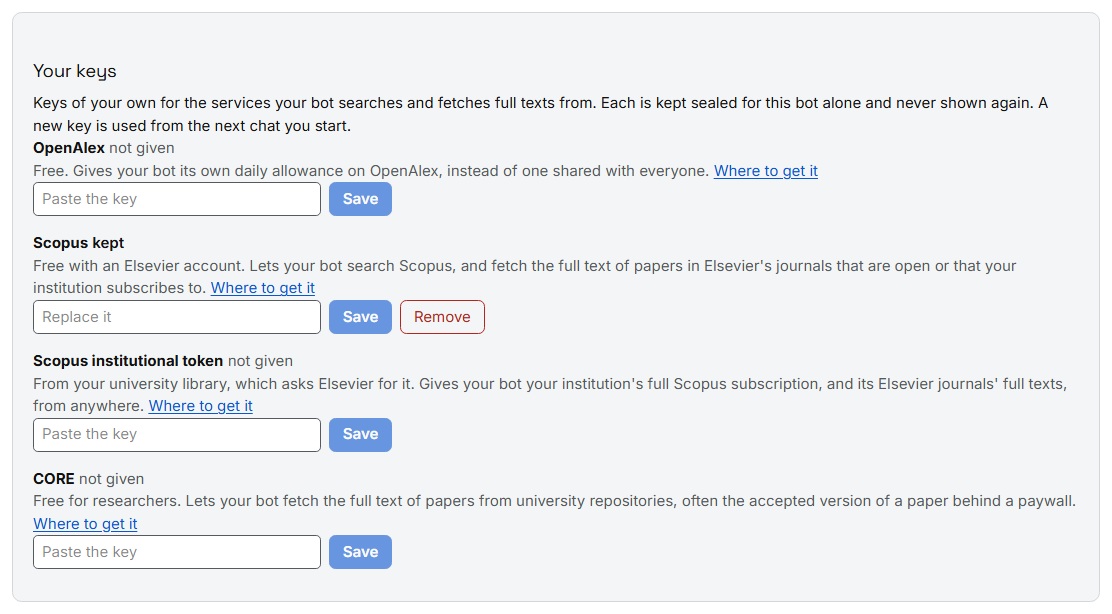
Give it your Scopus key. On the bot's page, under Your keys, paste your Scopus key and press Save (see Your keys for where to get one). The key is kept sealed for this bot alone and never shown again: the page says only that it is kept.
-
Chat with it. Press Chat, then Start chatting, and type:
search Scopus for exercise therapy for chronic low back pain, the 10 most cited
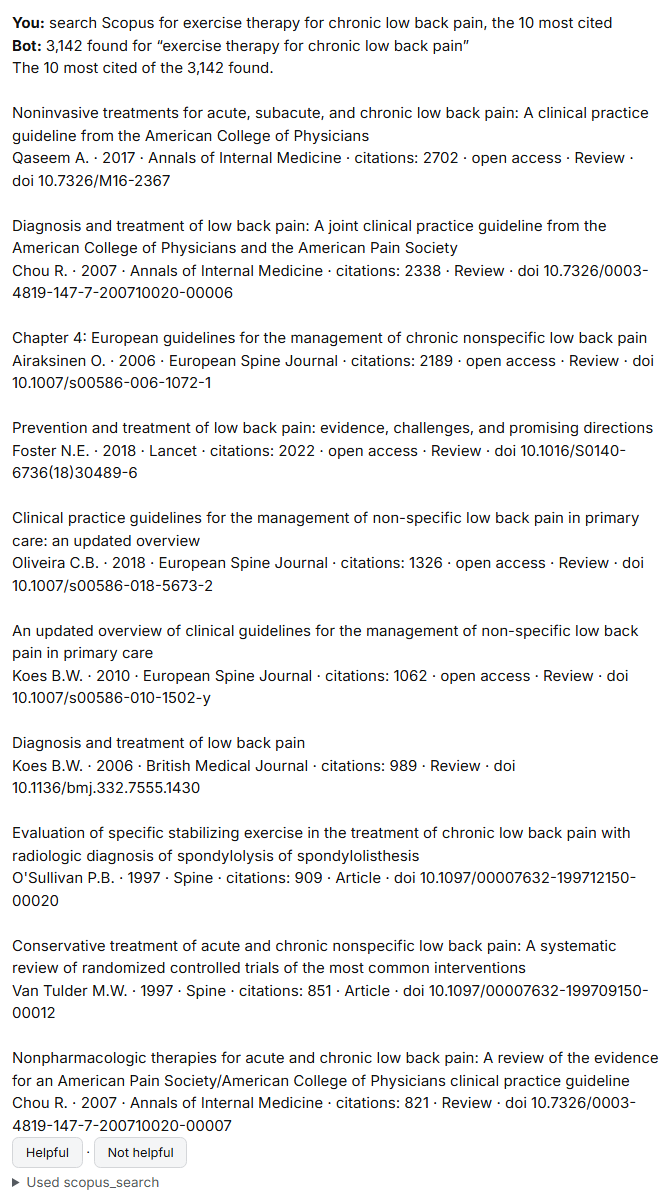
Each paper shows its authors, year, journal, citations, whether it is open access, and its DOI. Below the answer, Used scopus_search says which source answered.
-
Keep them. Type
add these papers to the review. Your review now has its first records, in the bot's files asreview.csv.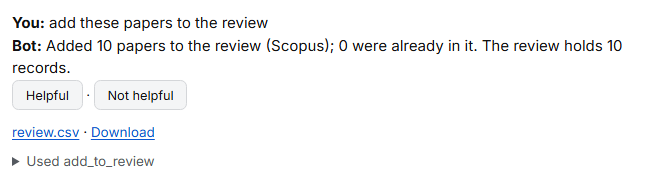
From here, the rest of this page goes through everything the bot does, in the order a review uses it.
Your keys
The bot searches OpenAlex, PubMed, Europe PMC, arXiv and Crossref with no key. A key of your own adds more. Each key is entered on the bot's page under Your keys, kept sealed for that bot alone, and never shown again. A new key is used from the next chat you start.
| Key | What it gives your bot | Where to get it |
|---|---|---|
| OpenAlex | Its own daily allowance on OpenAlex, ten times the shared one, faster searches, and results past the first page. Free. | Sign up at openalex.org, then copy the key from your API key page. |
| Scopus | Searches in Scopus, and the full text of papers in Elsevier's journals that are open or that your institution subscribes to. Free with an Elsevier account; Elsevier grants the access through your institution. | Request it at dev.elsevier.com (I want an API key). |
| Scopus institutional token | Your institution's full Scopus subscription, and its Elsevier full texts, from anywhere, not only from the campus network. | Your university library asks Elsevier for it (Elsevier support). |
| CORE | The full text of papers from university repositories, often the accepted version of a paper behind a paywall. Free for researchers. | Register at core.ac.uk. |
The bot never sends your email address to a service.
Finding papers
With no source named, the bot searches OpenAlex: 250 million works across every field.
find the top 20 most cited papers on exercise therapy for chronic low back pain
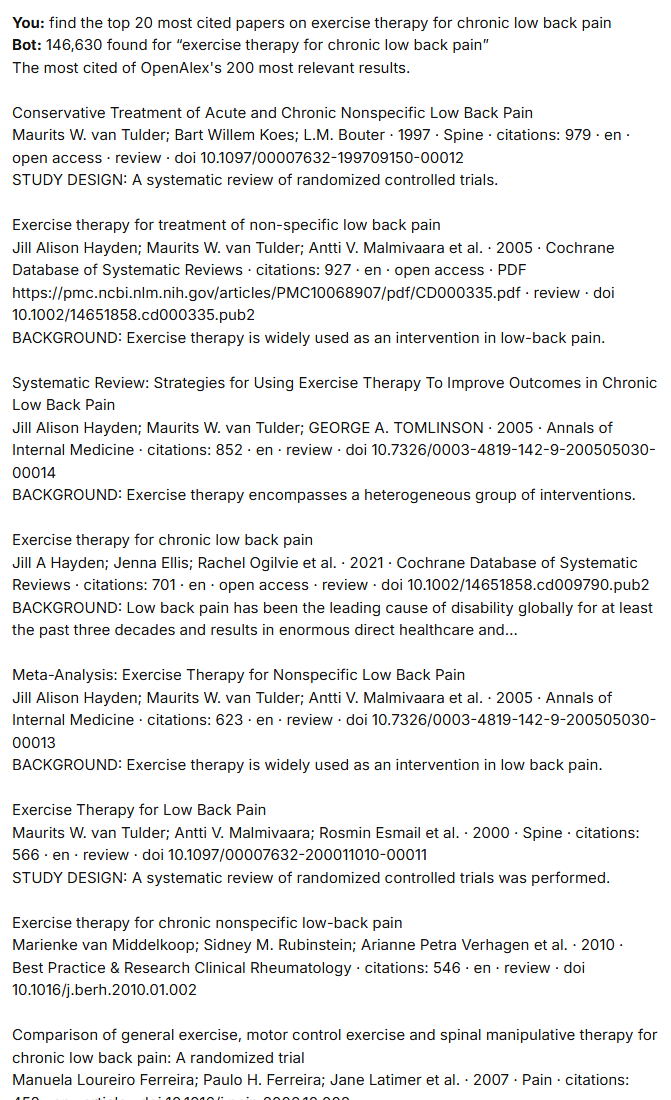
Most cited and newest sort the most relevant results of the search, not the whole database: the answer says how many it sorted. Ask for the top 20, the 50 newest or all results; without a number you get the ten most relevant, and the rest are kept for the next step.
Searching a named source
Name a source to search it: PubMed, Europe PMC, Scopus, arXiv or Crossref.
search PubMed for exercise therapy chronic low back pain randomized controlled trial, the 30 newest
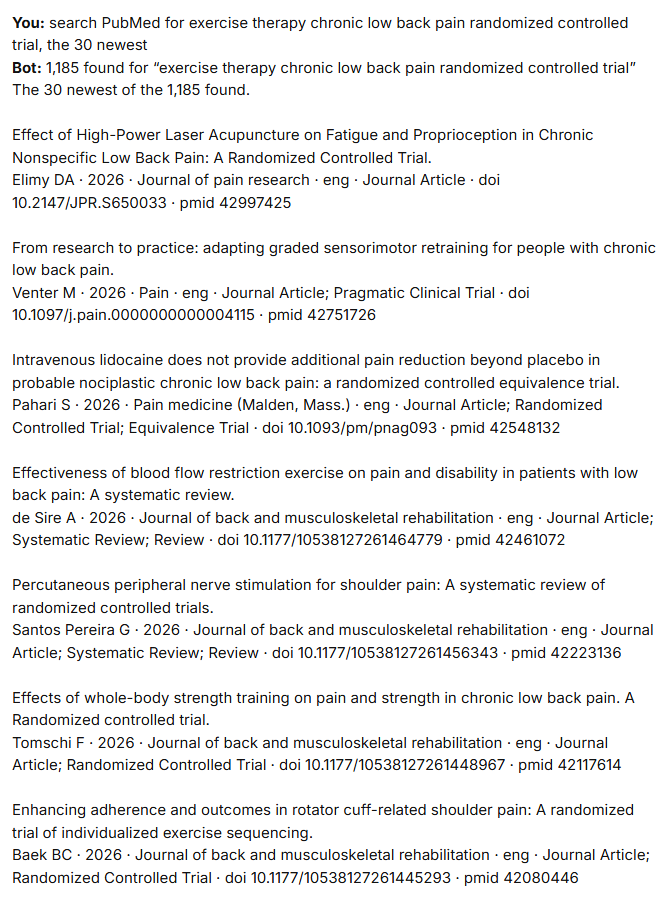
A source the turn does not name is never searched: find papers on sleep goes to OpenAlex, never to PubMed.
Search words: AND, OR, NOT
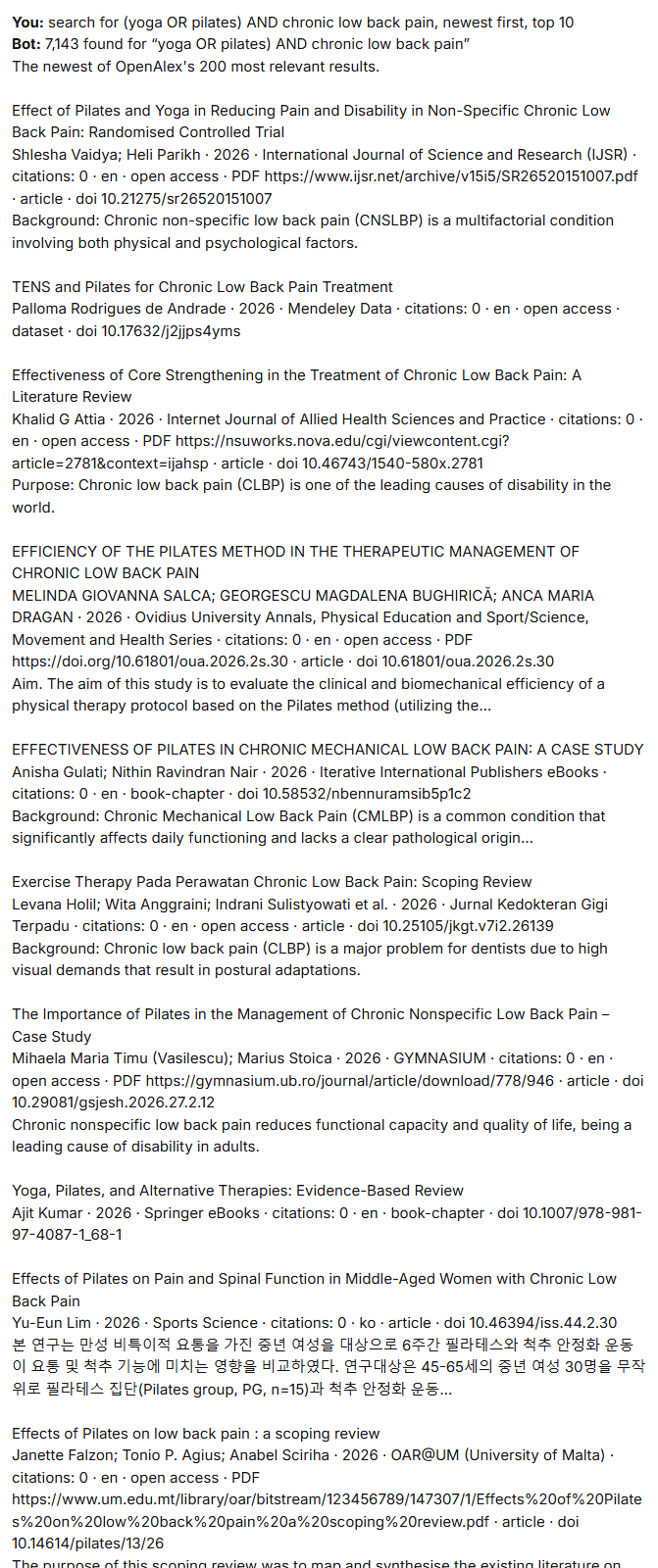
Write the search as you would in a database, with AND, OR, NOT and brackets:
search for (yoga OR pilates) AND chronic low back pain, newest first, top 10
Retracted papers
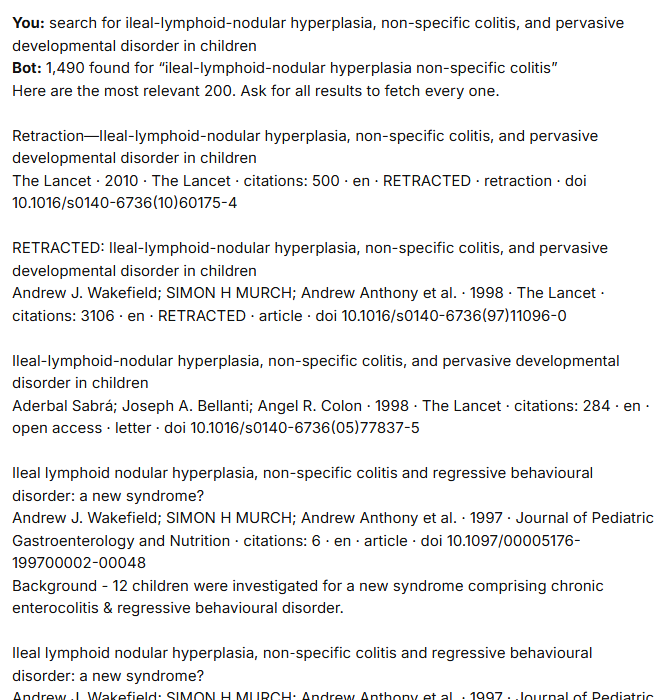
Every paper the bot shows carries RETRACTED where its publisher withdrew it, so a withdrawn study is never taken for a sound one.
search for ileal-lymphoid-nodular hyperplasia, non-specific colitis, and pervasive developmental disorder in children
Summaries
summarise these papers
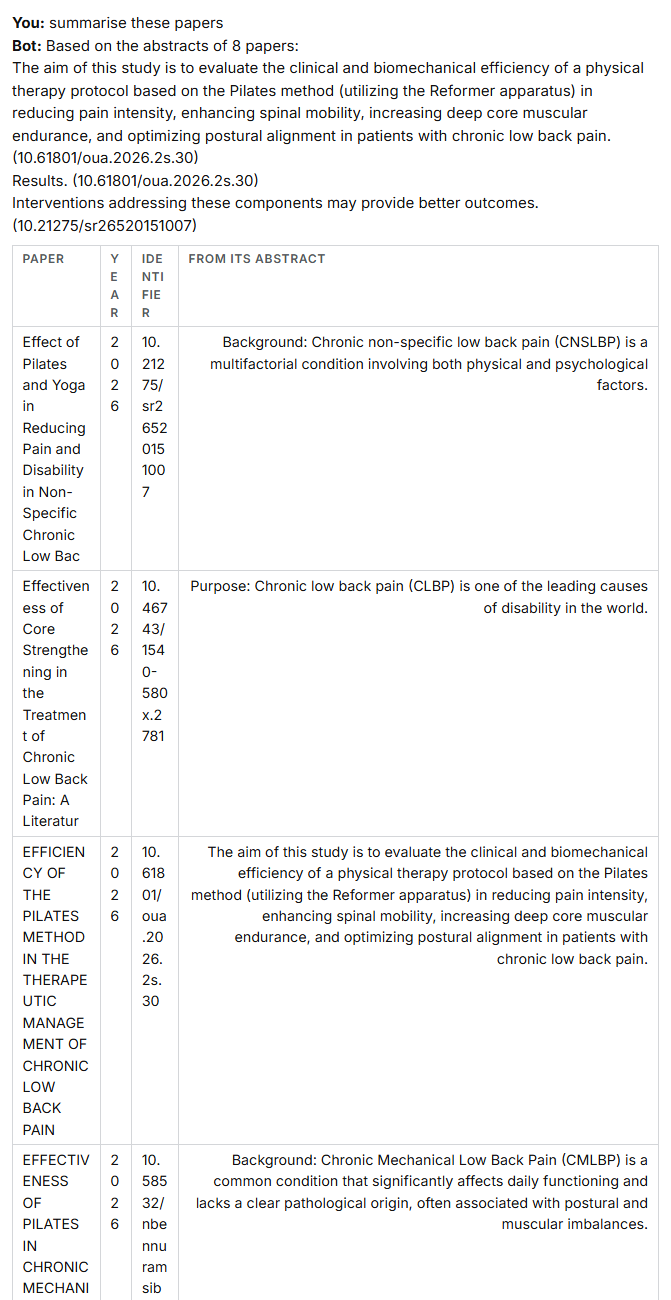
A summary is built from the papers' own abstracts, with each paper named, and says that it is.
Adding papers to the review
add these papers to the review
The review is a file in the bot's folder, review.csv, that opens in Excel. Adding the same paper twice keeps
one; a near match, the same work under another title or from another source, is marked as a possible duplicate
for you to settle in the screening view.
Add a paper you already know by its DOI:
add 10.1136/bjsports-2019-100780 to the review
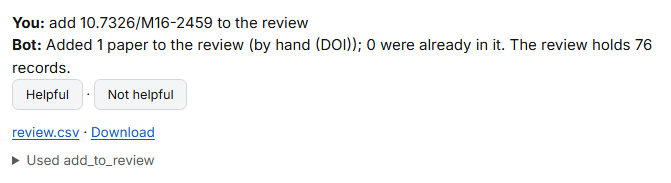
A paper added by hand is counted in PRISMA as found by other methods, not from a database.
Importing from a database or a reference manager
Attach an export with the paper clip: PubMed (.nbib), Scopus or Web of Science (.ris, .csv), Zotero, EndNote
or Mendeley (.ris, .bib). The bot recognises it by its contents and offers to import it.

Press Import into the review. Records already in the review are recognised and not added again:

Screening by criteria
Say your inclusion criteria in your own words:
screen the papers: from 2015 onwards, randomised trials only, in English
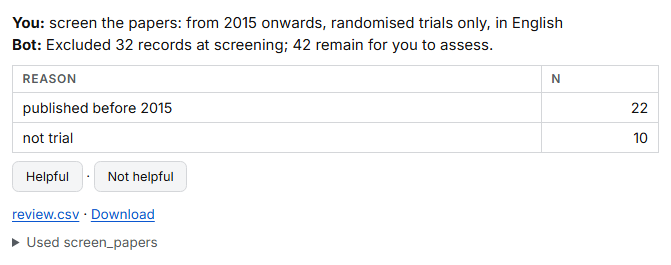
The bot excludes only what the criteria clearly rule out, with the reason, which the PRISMA flow counts. A paper counts as a trial where its source says so, or where its own abstract does (randomised, randomized controlled). Everything else is left for you.
The screening view
Press Screen papers beside the chat. One record at a time, with its title, authors, journal and abstract:
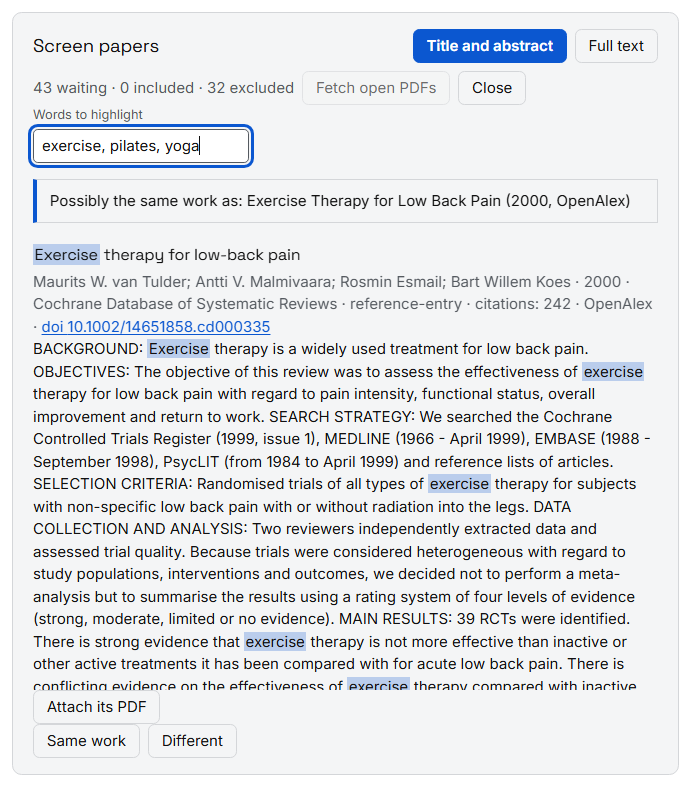
- Yes, Maybe or No (keys
Y,M,N); No asks for the reason. - Words to highlight marks your words in every abstract.
- A possible duplicate comes first, with Same work and Different.
- Each record is marked Randomised trial where it is one.
- Once you have included and excluded a few, the records most like your includes come first, so the relevant ones are found early.
Two reviewers, blind
A review can be screened by two people, each blind to the other's decisions, as Cochrane asks.
- Invite your colleague to your organisation from Account.
- Open Review team from the chat, choose Two reviewers, blind, and send your colleague the join link.
- Each of you screens in the Screen tab. Neither sees the other's decision.
- Where you disagree, or both say maybe, the record goes to Conflicts, for the resolver you named.
- Team and progress shows how far each of you has got and how often you agree: percent agreement and Cohen's kappa.
The team works on the bot's own files, without the chat.
Fetching the full texts
download the PDFs of the included papers
The bot tries, for each included paper, in this order, and keeps the first copy it reaches:
- the PDF link the search gave;
- arXiv, for a preprint there;
- Europe PMC, for a paper open in PubMed Central;
- Elsevier, with your Scopus key, for Elsevier's journals;
- CORE, with your CORE key, for a repository's copy;
- the open copy OpenAlex knows.
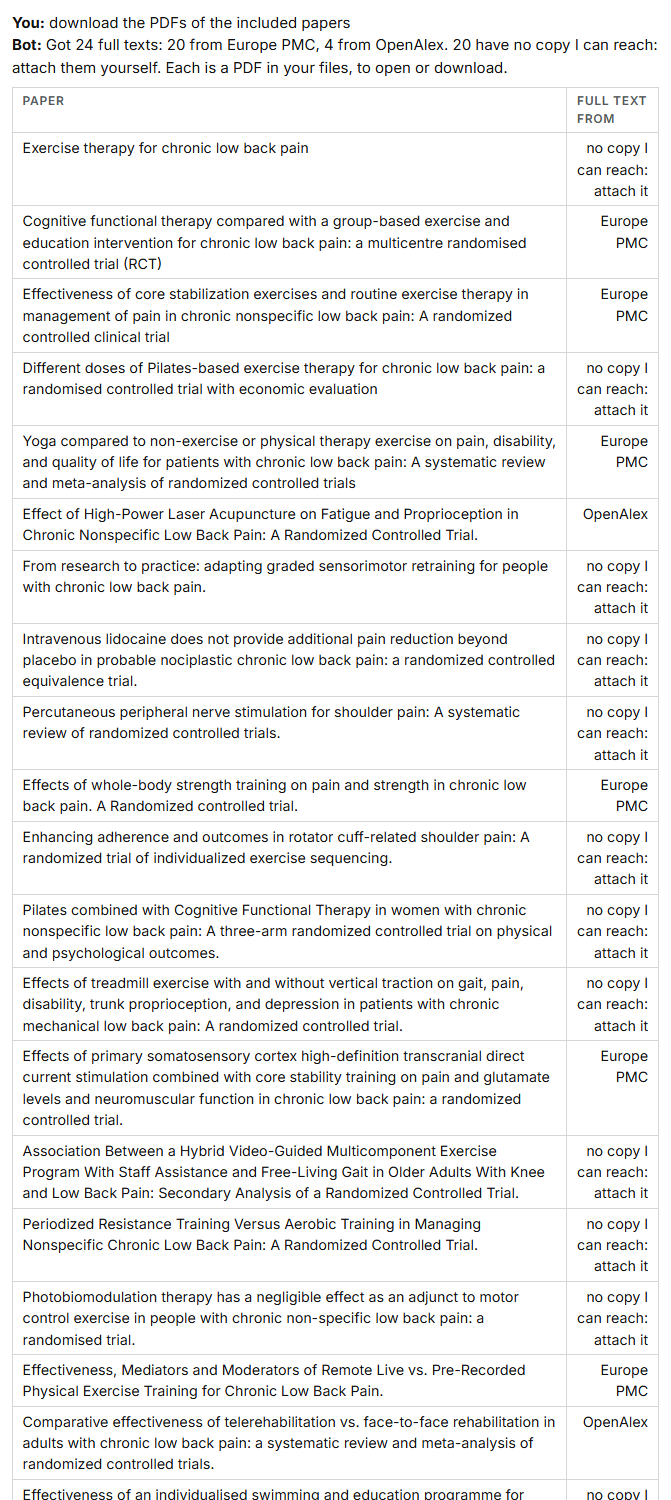
Each full text is a PDF in your files, listed under the answer with Open and Download; where a source gave the text rather than a PDF, the bot writes it into a plain, readable PDF. A paper it cannot reach is listed for you to attach: Attach its PDF in the screening view.
Screening the full texts
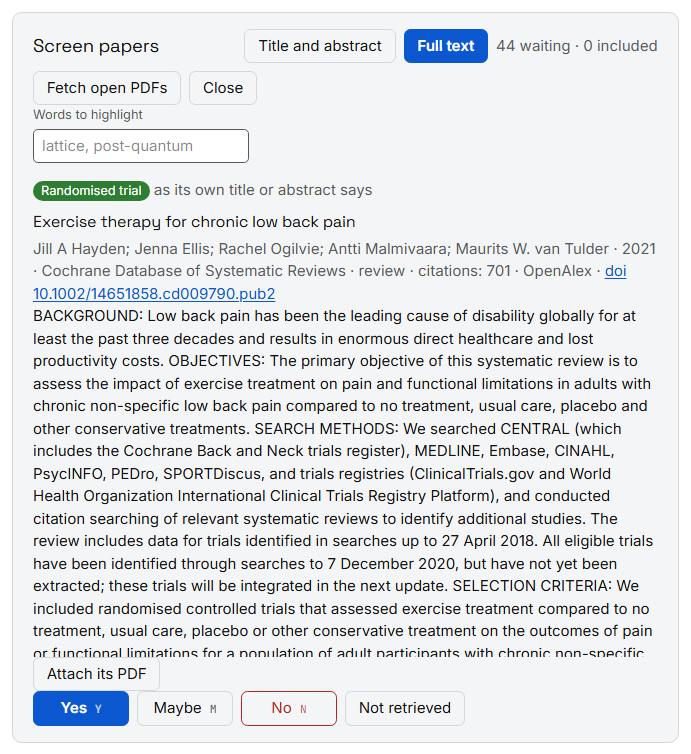
In the screening view, press Full text. The included papers come back, each with Open its PDF, for the second screening. Not retrieved marks a paper whose full text could not be had; PRISMA counts it.
The PRISMA 2020 flow
make the PRISMA table
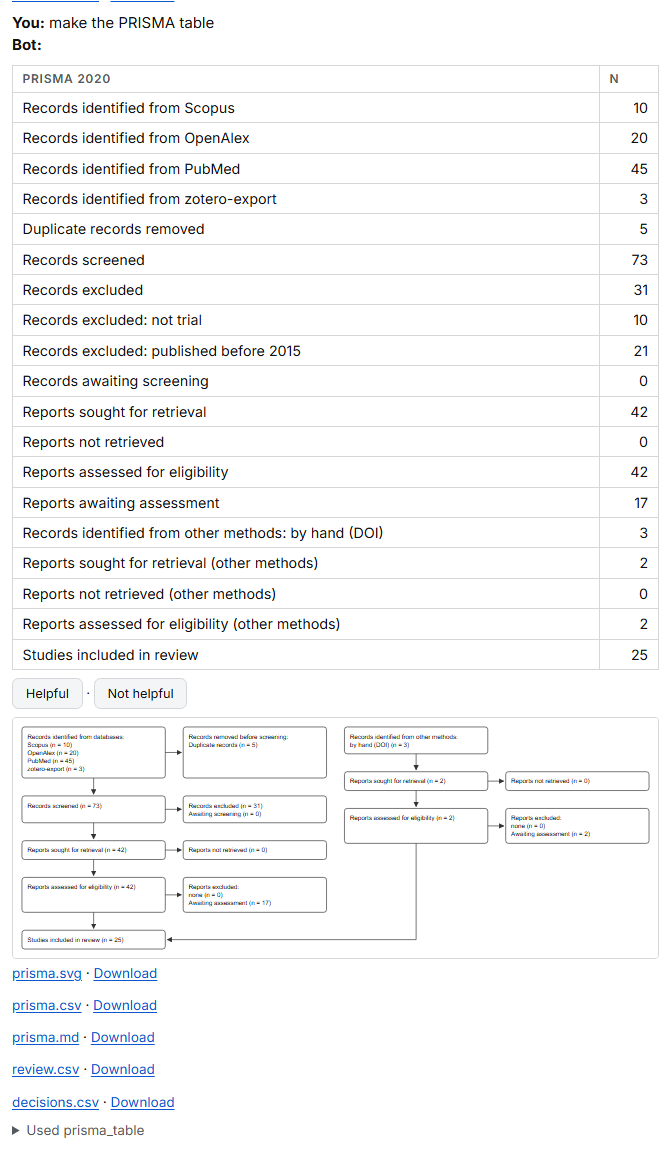
The table and the diagram follow PRISMA 2020: records from each database, duplicates removed, records screened
and excluded with their reasons, reports sought and not retrieved, reports assessed, and the studies included.
Papers found by other methods, added by DOI or by hand, have their own column. The diagram is saved as
prisma.svg, and the counts as prisma.csv and prisma.md.
Extracting data
First say what to extract, naming the fields in your own words:
create a data extraction form with the fields sample size, population and outcomes

Then:
extract the data
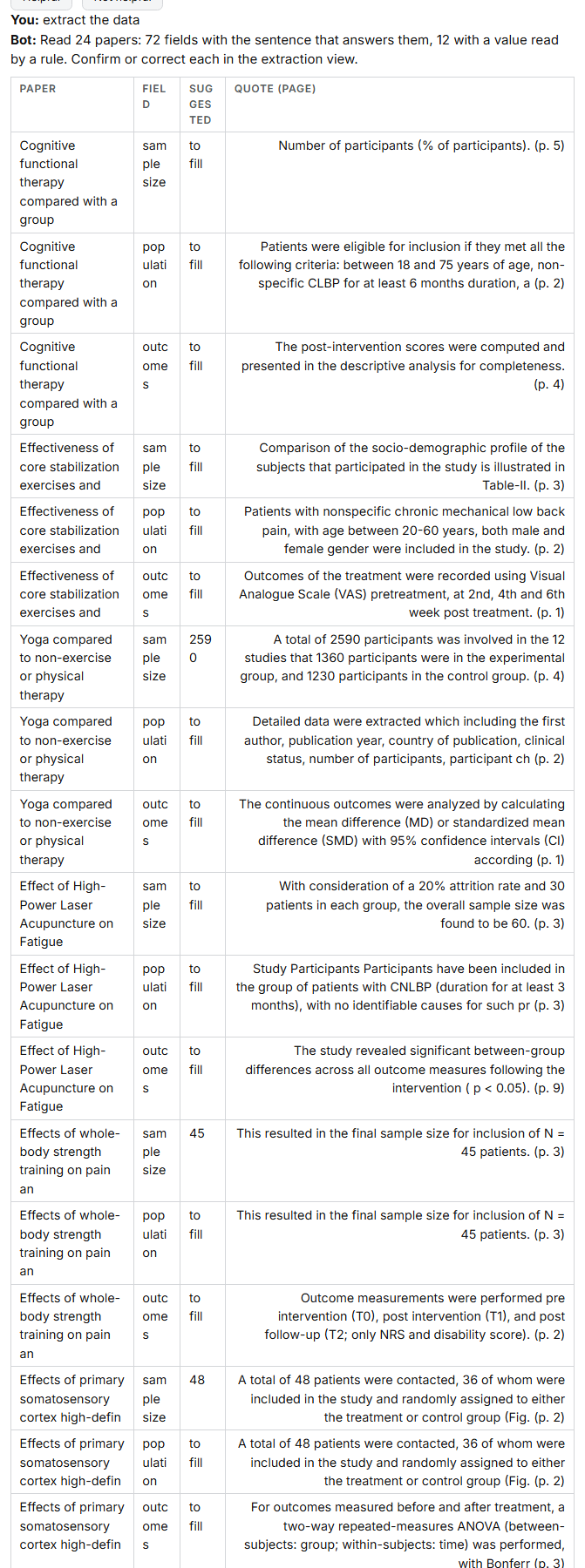
For each included paper with its full text, each field gets the sentence that answers it, with its page. Numbers the bot can read for sure, such as a sample size, are suggested; everything else waits for you. Press Extract data beside the chat to confirm or correct each value, beside its quote:
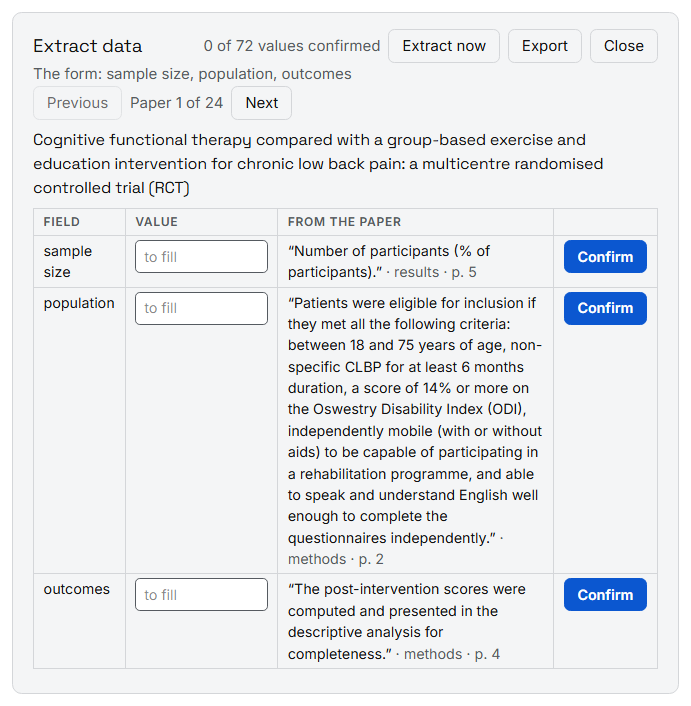
Export, at the top of the extraction view, writes one row per study, for Excel.
Risk of bias
assess the risk of bias of the included papers
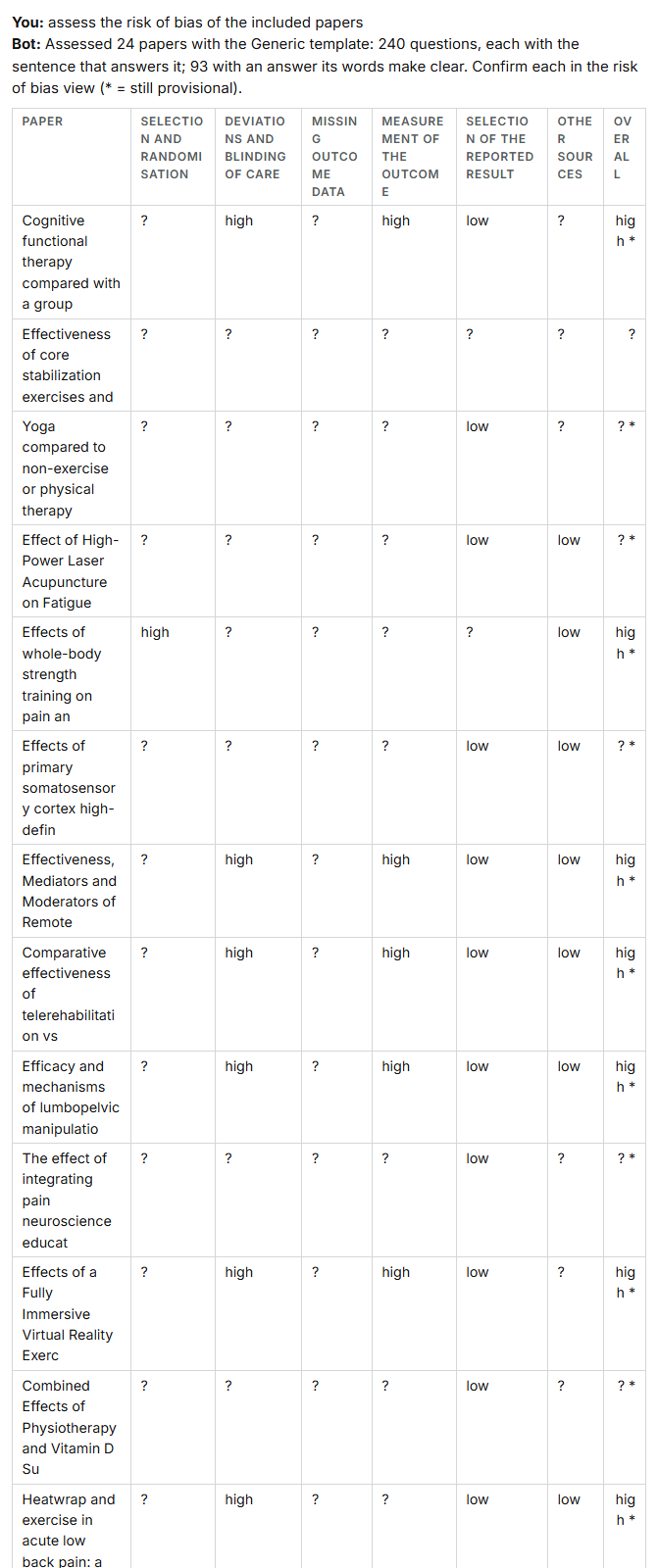
The bot reads each paper against a template's questions and quotes the sentence that answers each. It suggests an answer only where the words are clear, for example computer-generated or sealed opaque envelopes. The domain and overall judgements stay provisional until you confirm the answers, in Risk of bias beside the chat.
The bot ships a generic template. RoB 2, ROBINS-I and JBI's checklists have licences of their own: an owner who holds the right attaches the template file, and the bot uses it.
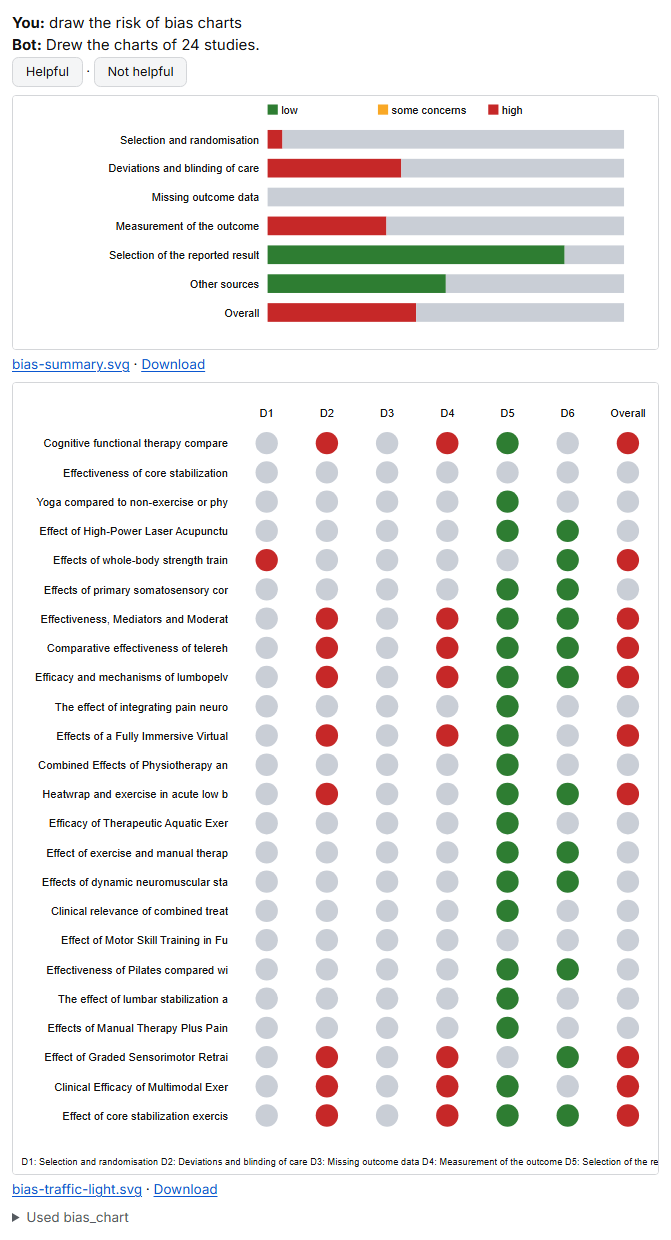
draw the risk of bias charts
The review's topics
map the topics of my review
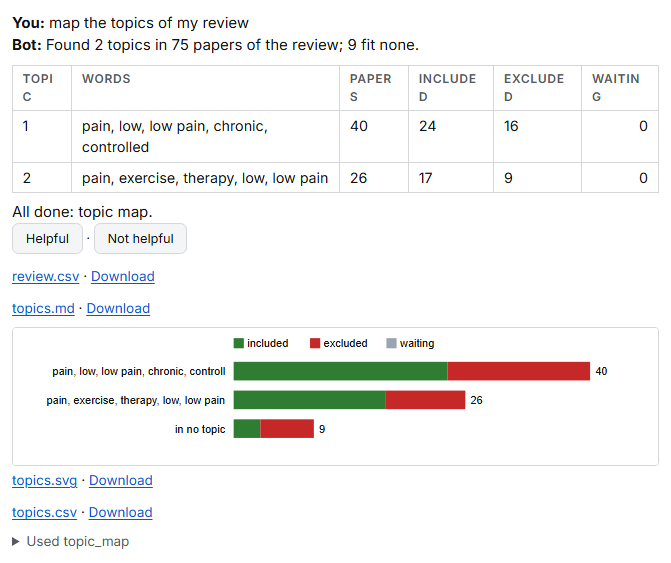
The bot groups the review's papers by what they are about (BERTopic, with the bot's own model), names each topic
by its words, and counts how many papers of each were included, excluded or are waiting. The map is saved as
topics.svg.
Checking a paper's references
Attach a paper's PDF with the paper clip, then:
check the references of this paper
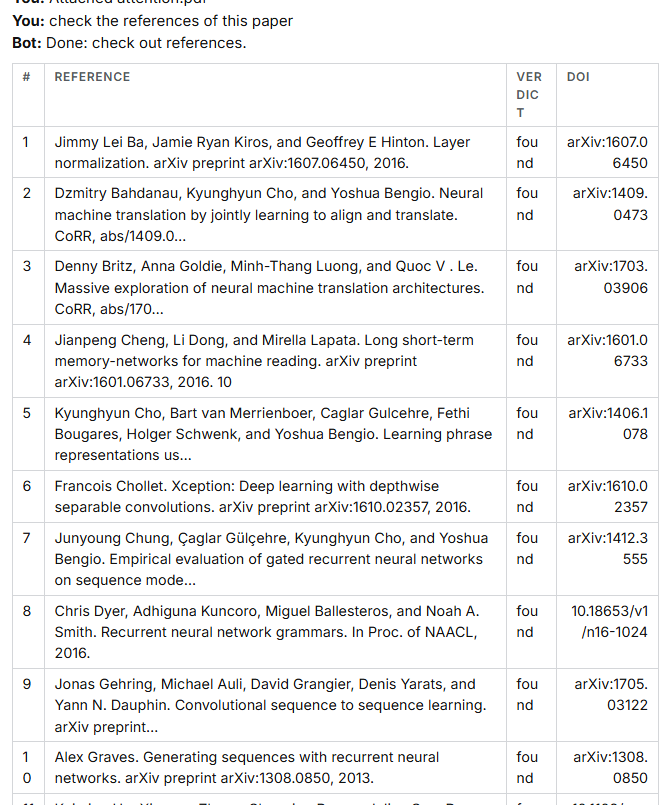
Each reference is looked up by its title and authors: found, with its DOI, not found, or retracted.
Exporting
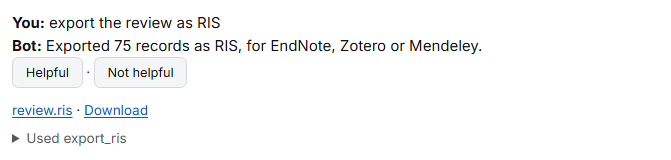
export the review as RIS
The whole review as RIS, for EndNote, Zotero or Mendeley.
export the included studies for RevMan
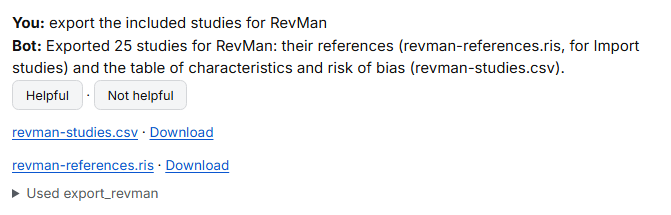
Two files: the references, for RevMan's Import studies, and a table of each study's characteristics and risk of bias.