The guardrail
The guardrail checks every tool call an LLM agent makes before it runs, and answers allow, ask the person or refuse, naming the rule that decided. It works with any agent: give it the tools you give your model, and it checks each call the model proposes.
Nothing in it is guessed by a language model: the same call and the same rules always give the same answer.
Guaranteed:
- Every tool call is checked before it runs, by the same rules, and the same call, context and rules always give the same answer.
- A tool not on your list never runs; a call whose values break the tool's own description never runs.
- A write no rule allowed never runs without a person's yes, and that yes covers exactly the call shown.
- A value in a write that nobody said and no tool returned is asked about.
- Nothing in a decision is guessed by a language model.
Not guaranteed:
- It judges tools, arguments, labels, history and rules, not what a reply means.
- It cannot tell a right value from a wrong one that someone did say.
- Your rules are only as complete as you wrote them: the bug hunter looks for holes.
- A tool whose name and description hide what it does may be classed wrongly: mark it.
- Calls made outside the guardrail are not checked.
The steps below follow one support desk, with four tools: look up an order, refund a card, send an email and save a note. The numbers in each picture match the numbered steps under it, and every line in a picture was printed by the guardrail itself.
What each check does
Every rule of the guardrail, in the order it is applied; the first that applies decides.
| Check | What it does, simply | When it stops a call | Can be switched off |
|---|---|---|---|
| Tool kinds | Each tool is known to read, change something or send something out: from your file, the tool's own marks, or its name, description and arguments. A tool nobody marked counts as one that changes something. | asked (a tool not known to read is a write) | yes |
| Tool withdrawn | A tool its owner withdrew from the registry cannot be used. | refused | no |
| Address not allowed | A call cannot reach an address you do not allow, such as the cloud's metadata service or the company's own network. | refused | yes |
| Not the approved plan | Where a person approved a plan, a call that is not its next step does not run. | refused | yes |
| Plan's tool tier | Not active yet: every call passes. | never (not active yet) | yes |
| Labels | Not active yet: every call passes. Outside content is stopped by the outside content check. | never (not active yet) | yes |
| Payment limit | Not active yet: every call passes. Spending limits are set in your rules. | never (not active yet) | yes |
| Allowed tools | Only tools on your list can be used, and only by a named agent where you say so. | refused | no |
| Session record | The record of the calls already made must be intact; if anyone altered it, nothing more runs. | refused | no |
| Arguments | Each call's values must fit the tool's own description (types, required fields, allowed values). | refused | yes |
| Destinations | A tool may send something to an address only if it is known to send things out. | refused | yes |
| Order | A tool runs only at an allowed point: after another, never after another, or at most N times. | refused | yes |
| Undo | An undo must match the step it reverses, and a step is undone only once. | refused | yes |
| Your rules | Your own rule sheet decides, e.g. "refunds over 100 need a manager"; limits per period and spending limits too. | refused or asked, as the rule says | yes |
| Outside content | A call proposed after reading outside content (a web page, an email) is stopped where you forbid it. | refused, or asked where your setting asks | yes |
| Confirmation | A call needing a person's yes runs only with that yes, signed; if nobody can give it, it does not run. | refused | no |
| Any other write | Anything that changes something and no rule allowed waits for a person's yes. | asked | no |
| Grounding | A value in a write that nobody said and no tool returned is asked about, never allowed and never refused. | asked | yes |
| S1: sending verb | Where the person's turn asks to send something out and no tool sends anything, the call is stopped. | asked by default; refused in strict mode | yes |
| S2: destination | Where the turn names a place to send to that no tool takes, and the call does not take it either, the call is stopped. | asked by default; refused in strict mode | yes |
| Confirm read | The call is read against the turn, its values as typed. Where the turn gives a value the call lacks, or a different one, the person is shown both and asked. The call is never changed. | asked by default; refused in strict mode | yes |
1. Put the guardrail in front of your tools
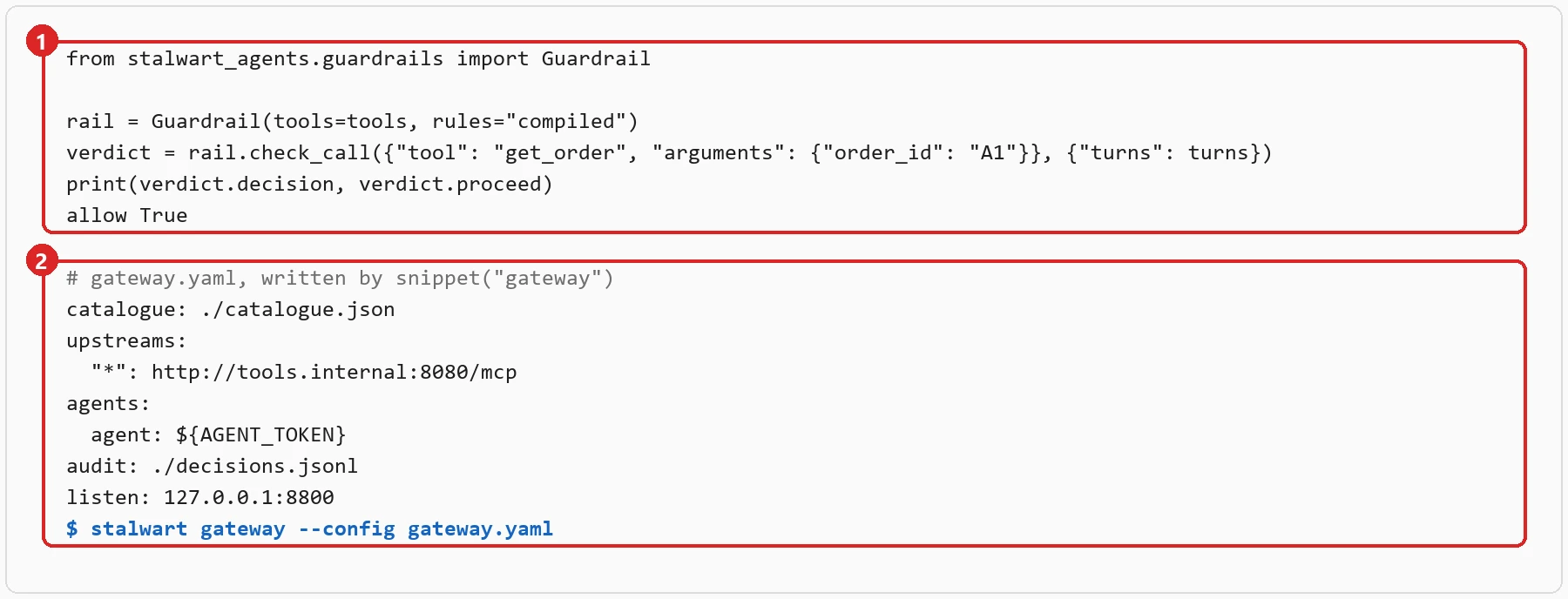
- In Python, three lines: the guardrail is made from the tools you give your model, and each call is checked
before your code runs it. Install it with
pip install stalwart-agents. - In front of an MCP server,
stalwart gatewaychecks every call on its way to the server. Thesnippettool ofstalwart mcpwrites its configuration for you.
2. Write your rules
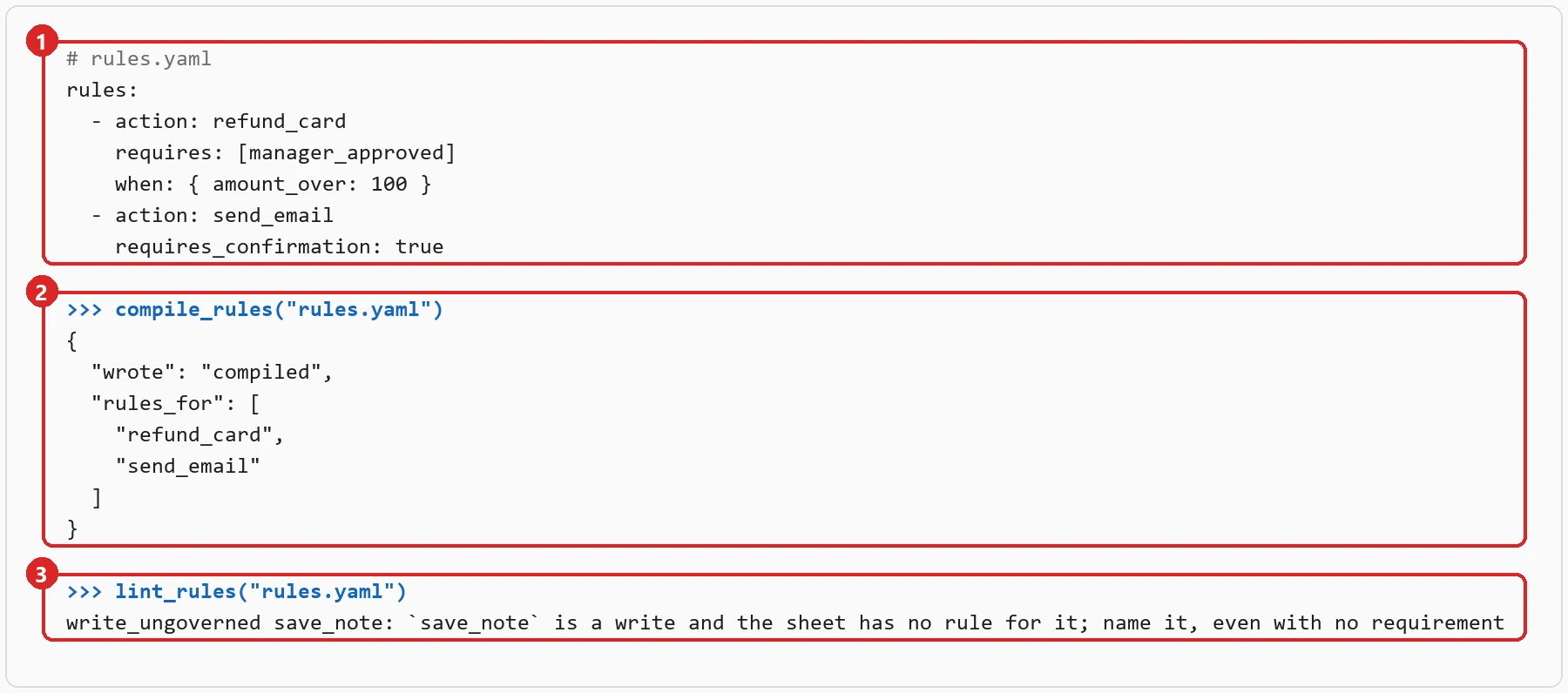
- Your rules are a rule sheet: plain YAML a person can read aloud. Here, a refund over 100 needs a manager's approval, and every email waits for a person's yes.
- The sheet is compiled once; the decisions are then made on your own machine.
- The sheet is checked against your tools: here,
save_notechanges something and no rule names it, so you are told, and can decide.
3. A call is allowed, asked about, or refused
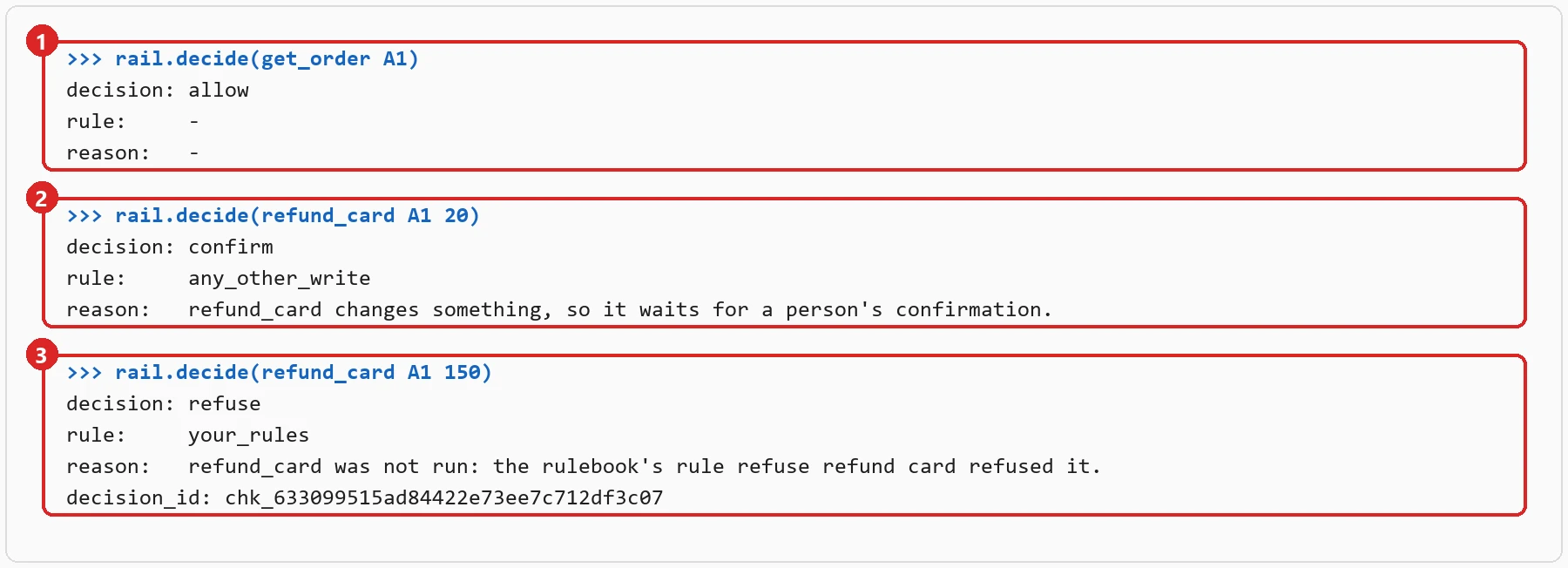
- Looking up an order only reads, so it is allowed.
- A refund of 20 changes something and no rule allows it outright, so it waits for a person's yes.
- A refund of 150 breaks the rule of step 2, so it is refused, and the answer names the rule and gives an id to look it up by.
4. An amount nobody said is asked about
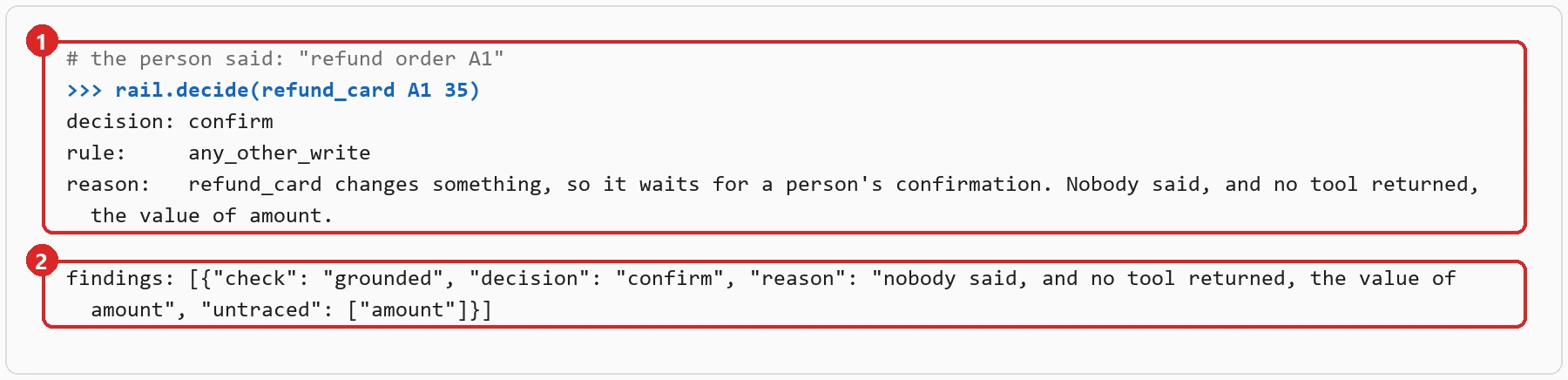
- The person asked for a refund but never said how much. The model proposed 35 anyway.
- No one said 35 and no tool returned it, so the guardrail asks the person before anything runs. It never fills a value in, and never changes the call.
5. Add it to your Guardrails AI guard
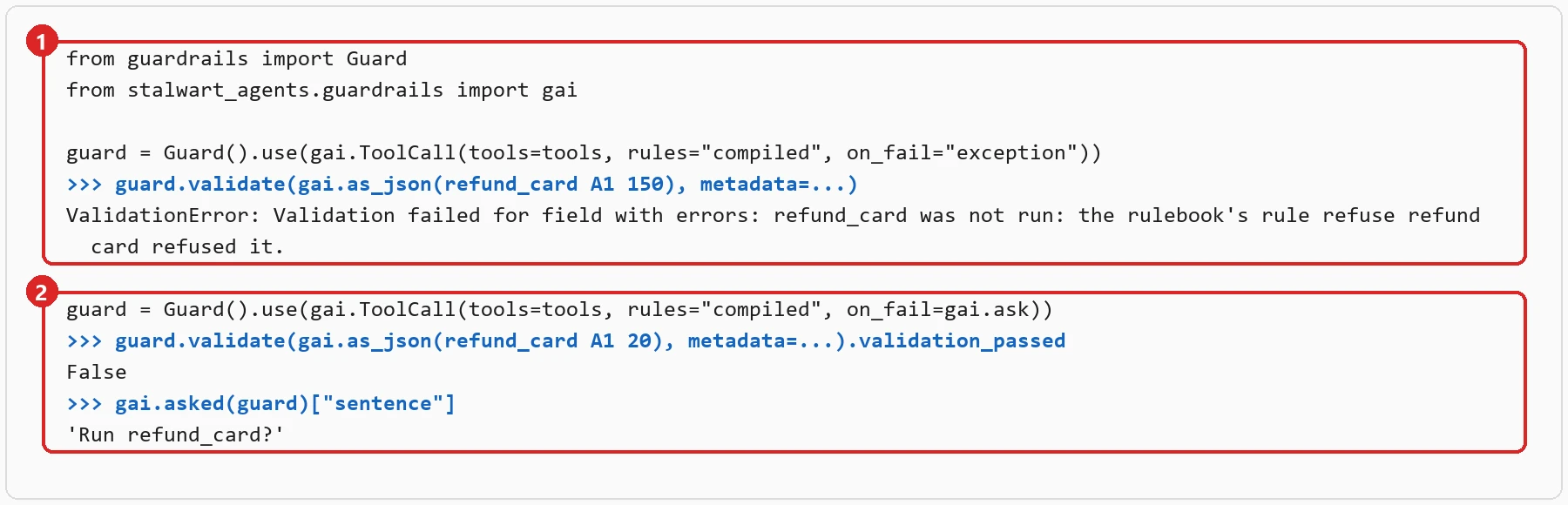
- Install
stalwart-agents[guardrails]and add our validator to your guard. A refused call arrives as Guardrails AI's own failure, with the rule's sentence. - With
on_fail=gai.ask, a call that needs a person is held back, andgai.asked(guard)gives you the sentence to show them. On their yes, validate the same call again with the tokengai.approvegives.
6. Ask the MCP server what it can do
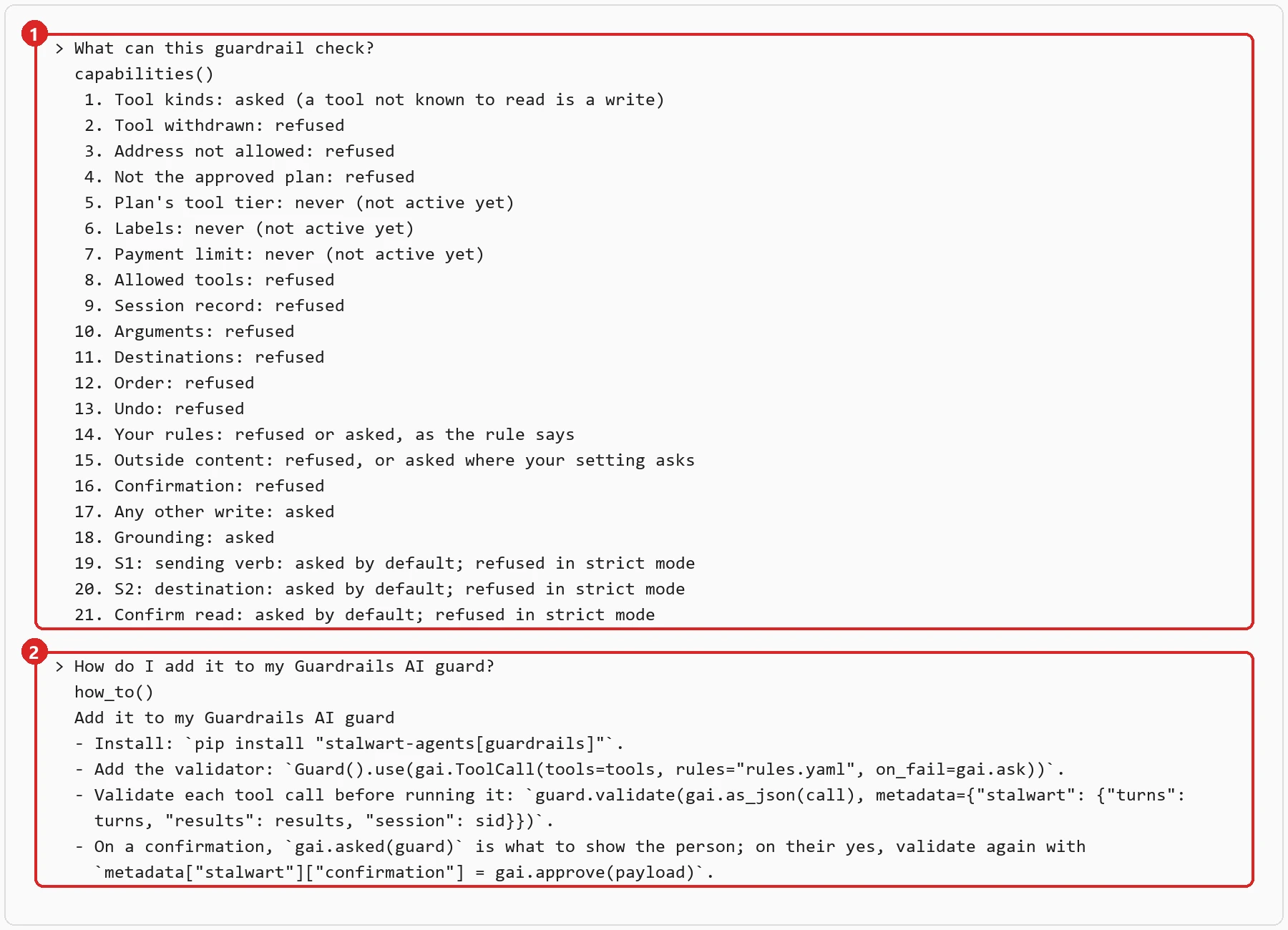
- Add
stalwart mcpto your AI assistant (Claude Code, Cursor, VS Code) and ask what the guardrail can check: it answers from the guardrail's own list. - Ask how to add it to your Guardrails AI guard, and you get the steps. The
build-guardrailprompt walks your assistant through building one with you; it never calls a model of ours.
7. Measure it on your own calls
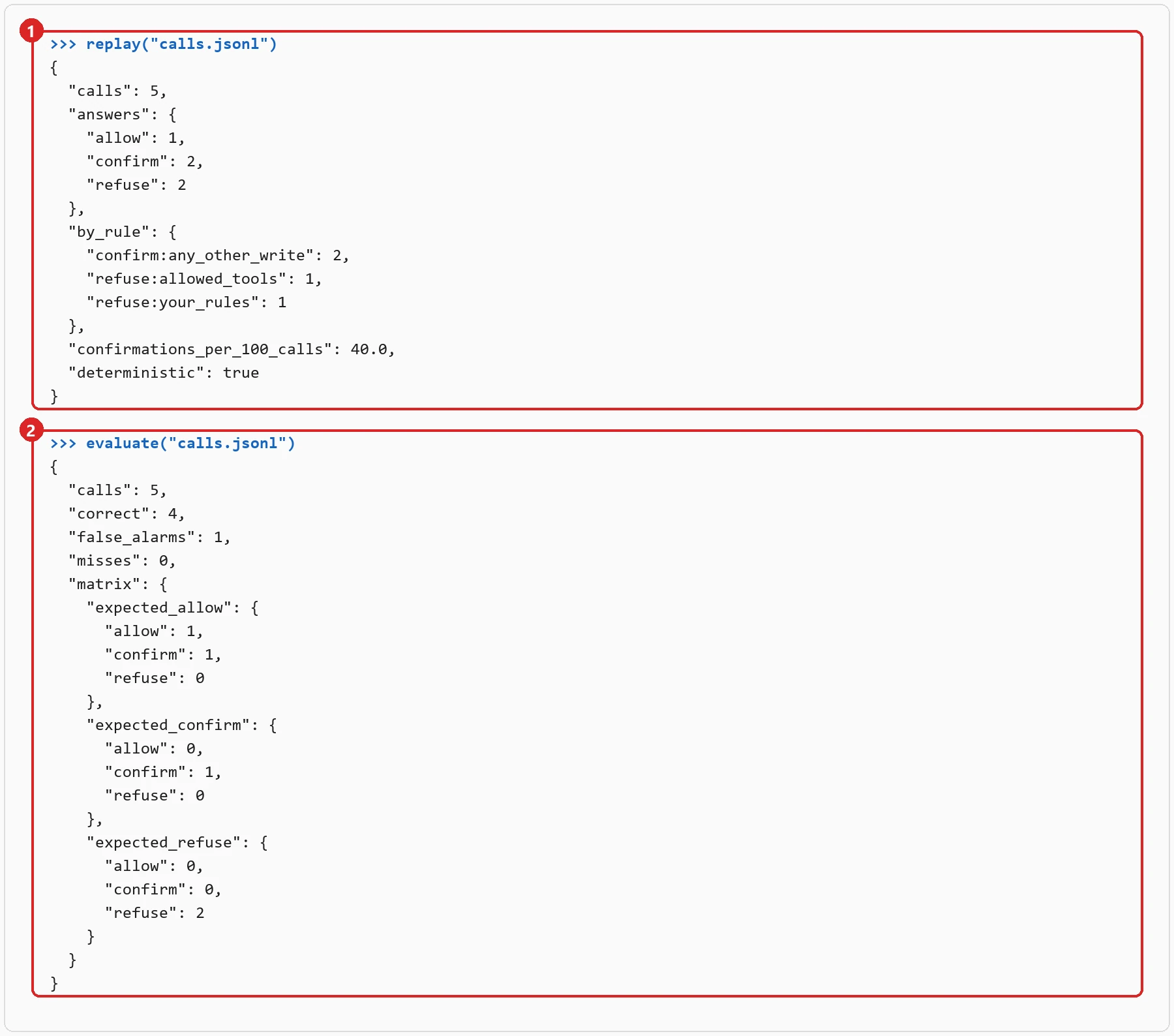
replayruns your agent's past calls through the guardrail: how many it would have allowed, asked about and refused, by which rule, and whether a second run gave the same answers.- Label each call with what should have happened, and
evaluatecounts the false alarms (calls that should run, stopped) and the misses (calls that should be stopped, let through).
8. Check your rules for holes
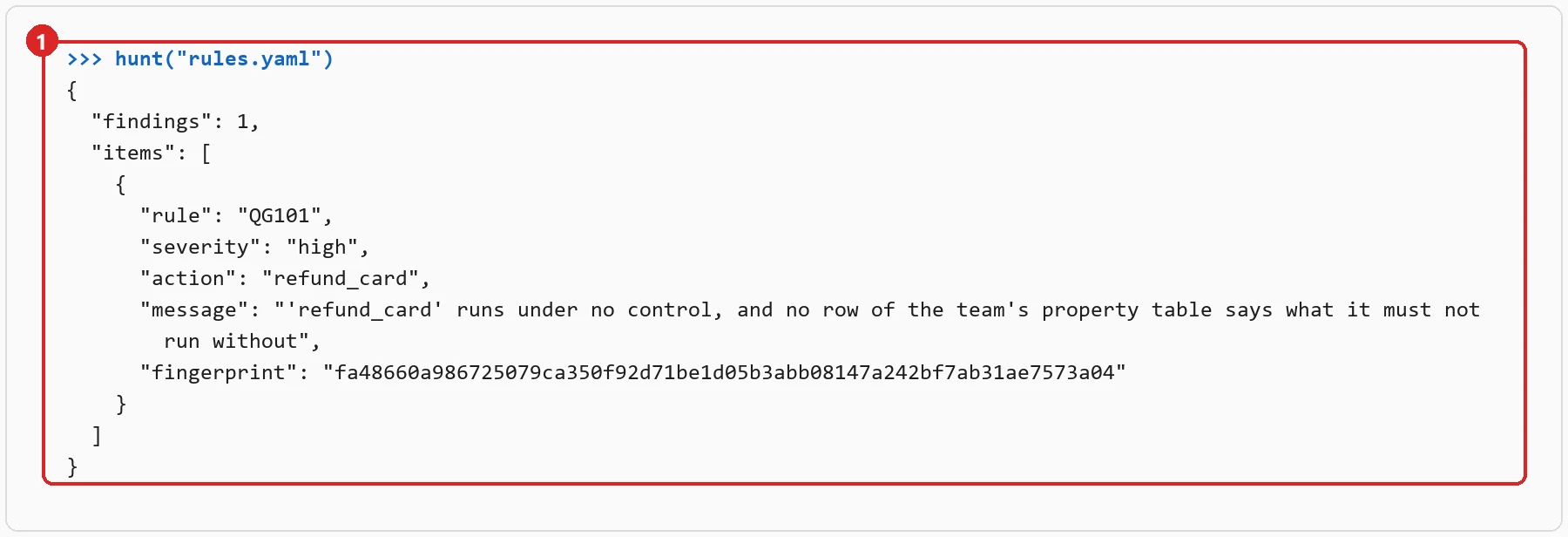
huntruns the bug hunter on your rule sheet. Each finding is something your rules let through, with what to look at; here, it asks you to say whatrefund_cardmust never run without, since no table of yours says so.
9. Why was this call refused?
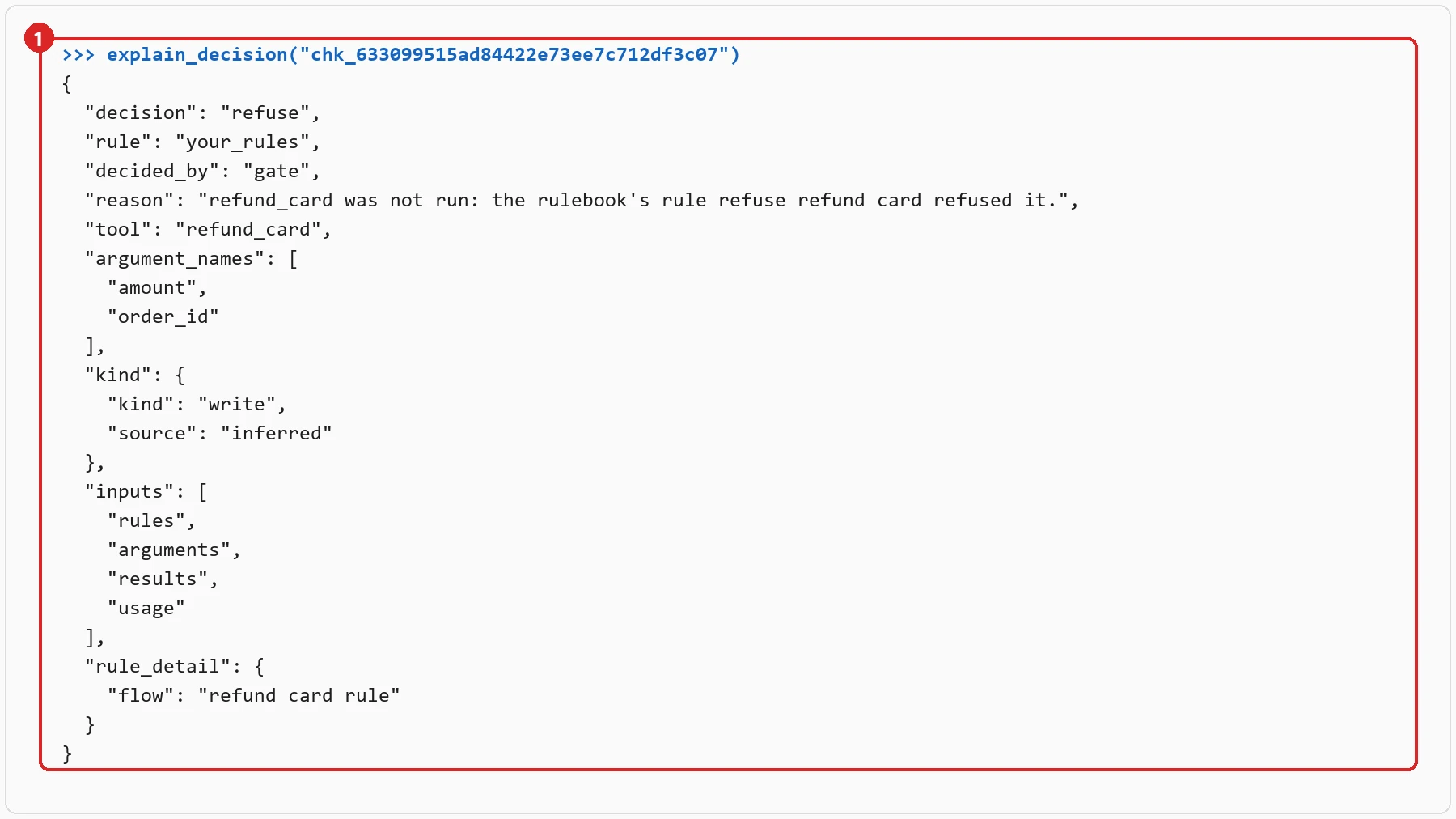
explain_decisionreads back a decision by its id: the rule, what it read, the tool and the names of its arguments. The values themselves, and anything the person said, are never kept.
Going further
The full manual, in English and Portuguese, is in the SDK documentation: building a
guardrail, the
checks, the rule
sheet, evaluating
it and connecting
it. stalwart mcp serves the same pages to your assistant.